The Integration Gap in Modern AI Engineering
Large Language Models (LLMs) possess remarkable reasoning capabilities, but they operate in isolation. Out of the box, an LLM is confined to its static training data, cut off from real-time information, local files, private databases, and internal APIs. To make AI truly useful, engineers have spent countless hours building custom integrations, writing bespoke glue code, and configuring ad-hoc API wrappers for every new model and data source.
This fragmented approach has created a massive maintenance burden. Every time a new LLM is released or a data schema changes, integrations break. To solve this systemic problem, Anthropic introduced the Model Context Protocol (MCP). MCP is an open-standard protocol designed to establish a secure, uniform, and bi-directional connection between LLM applications (hosts) and external data sources (servers).
In this comprehensive guide, we will explore the architecture of MCP, compare it to traditional integration patterns, and build a fully functional MCP server in Python to connect an LLM to real-world system metrics.
The Core Architecture of MCP
To understand MCP, we must look at its three-tier architecture. Instead of forcing every LLM client to write custom integrations for every tool, MCP introduces a standardized client-server model that separates the AI application from the data layer.
Refer to the architecture diagram below (mcp-architecture.svg) to see how these components interact:
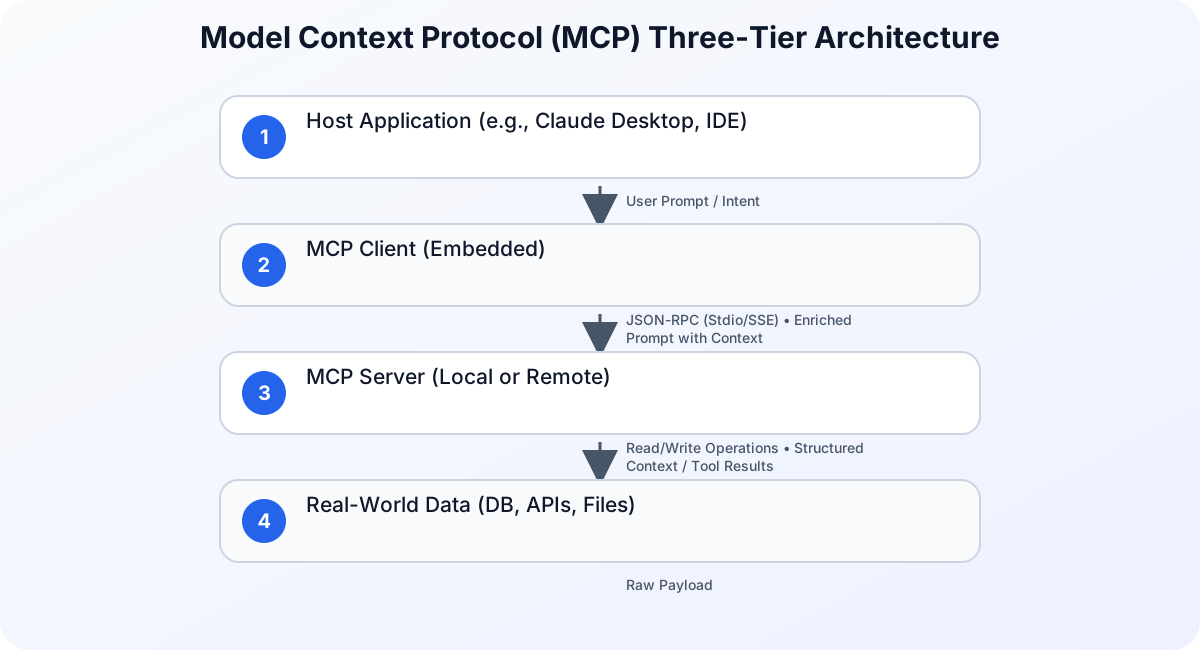
- The Host: This is the user-facing AI application where the LLM runs or is orchestrated (for example, Claude Desktop, a developer IDE, or a custom agentic workflow).
- The Client: A component embedded within the Host. The Client establishes a direct connection with the MCP Server, translating the LLM’s intent into standardized protocol requests.
- The Server: A lightweight, decoupled service that exposes specific capabilities (resources, prompts, and tools) to the client. The server interacts directly with local files, databases, or remote APIs, acting as a secure gateway.
This separation of concerns ensures that the LLM never needs direct access to raw database credentials or sensitive system APIs. Instead, it interacts with the Server via a highly controlled, structured protocol.
MCP Protocol Mechanics: Under the Hood
The Model Context Protocol operates on top of JSON-RPC 2.0, a lightweight, stateless remote procedure call (RPC) protocol. This choice ensures that messages are easy to parse, language-agnostic, and highly structured.
Transport Layers
MCP supports two primary transport mechanisms out of the box:
- Stdio (Standard Input/Output): Typically used for local integrations. The Host starts the MCP Server as a child process and communicates with it via standard input (
stdin) and standard output (stdout). This is incredibly fast and secure for local development and desktop tools. - Server-Sent Events (SSE): Used for remote integrations over HTTP. The client establishes a unidirectional connection to receive events from the server, while sending commands back to the server via standard HTTP POST requests.
The Three Primitives: Resources, Prompts, and Tools
MCP organizes all capabilities into three distinct primitives, giving developers fine-grained control over what the LLM can see and do:
- Resources (Read-Only): These are data sources that the LLM can read to gain context. Examples include local log files, database schemas, or API documentation. Resources can be static or dynamic.
- Prompts (User-Facing Templates): Standardized templates that help users construct high-quality prompts for the LLM. They act as pre-packaged workflows or shortcuts.
- Tools (Executable Actions): Executable functions that allow the LLM to perform actions in the real world. Tools can write files, execute code, trigger API calls, or run database migrations. Because tools can modify state, they typically require explicit user authorization before execution.
MCP vs. Traditional Integration Patterns
Before MCP, developers relied on custom API integrations, raw function calling, or heavy orchestration frameworks like LangChain and LlamaIndex. The table below highlights how MCP simplifies and standardizes this landscape:
| Feature | Custom API Integration | Function Calling (Raw) | Orchestration Frameworks | Model Context Protocol (MCP) |
|---|---|---|---|---|
| Standardization | None (Ad-hoc) | Model-specific schemas | Framework-specific | Open, universal standard |
| Coupling | Tight | Tight (Hardcoded in prompts) | Medium | Extremely Loose (Decoupled) |
| Transport | Custom (HTTP/gRPC) | Managed by provider API | Internal abstractions | Stdio / SSE (JSON-RPC) |
| Security Model | Hardcoded credentials | Direct model access | Framework-dependent | Gatekeeper architecture |
| Reusability | Low | Low | Medium | High (Any MCP server fits any host) |
While Python remains the dominant language for AI prototyping due to its rich ecosystem, some enterprise developers choose alternative stacks. For a deeper discussion on language choices in enterprise environments, you can read about Why I Still Prefer Java Over Python. However, for rapid MCP development, Python’s official SDK offers the fastest path to production.
Python Tutorial: Building Your First MCP Server
In this tutorial, we will build a custom MCP server in Python using the official mcp SDK. Our server will expose system metrics (CPU and memory usage) as a Tool and a Resource, allowing an LLM to monitor local system health in real-time.
Step 1: Set Up Your Project Environment
First, create a new directory for your project and set up a virtual environment. We will use pip to install the official MCP SDK and psutil to gather system metrics.
mkdir mcp-system-monitor
cd mcp-system-monitor
python3 -m venv .venv
source .venv/bin/activate
pip install mcp psutil
Step 2: Write the MCP Server Code
Create a file named server.py and implement the server. We will use the high-level FastMCP class provided by the SDK, which dramatically simplifies server registration.
import psutil
from mcp.server.fastmcp import FastMCP

# Initialize the FastMCP server
mcp = FastMCP("System Monitor")

@mcp.resource("system://metrics/summary")
def get_metrics_summary() -> str:
    """
    Returns a read-only text summary of the host system's current metrics.
    """
    cpu_percent = psutil.cpu_percent(interval=0.1)
    memory = psutil.virtual_memory()
    disk = psutil.disk_usage('/')

    summary = (
        f"System Status Summary:\n"
        f"----------------------\n"
        f"CPU Usage: {cpu_percent}%\n"
        f"Memory Usage: {memory.percent}% (Available: {memory.available // (1024**2)} MB)\n"
        f"Disk Usage: {disk.percent}% (Free: {disk.free // (1024**3)} GB)\n"
    )
    return summary

@mcp.tool()
def kill_process_by_name(name: str) -> str:
    """
    Terminates any running process matching the provided name.
    Use with caution.
    """
    terminated_count = 0
    for proc in psutil.process_iter(['pid', 'name']):
        try:
            if name.lower() in proc.info['name'].lower():
                proc.terminate()
                terminated_count += 1
        except (psutil.NoSuchProcess, psutil.AccessDenied, psutil.ZombieProcess):
            continue

    if terminated_count > 0:
        return f"Successfully terminated {terminated_count} process(es) matching '{name}'."
    return f"No active processes found matching '{name}'."

if __name__ == "__main__":
    # Start the server using standard input/output (stdio) transport
    mcp.run()
Step 3: Understanding the Code
Let’s break down what we did in server.py:
- FastMCP Initialization: We created an instance of
FastMCP("System Monitor"). This automatically manages the JSON-RPC lifecycle and transport layers. - Resource Registration: Using
@mcp.resource("system://metrics/summary"), we exposed a read-only endpoint. The LLM can query this URI to read the current system state. - Tool Registration: Using
@mcp.tool(), we exposed an executable action (kill_process_by_name). The SDK automatically inspects the Python function’s type hints and docstring to generate the JSON schema that the LLM needs for tool calling.
Step 4: Testing the MCP Server Locally
To test your server, you can use the official command-line developer tool called the MCP Inspector. It provides an interactive web interface to view resources, run prompts, and execute tools.
Install and run the inspector pointing to your Python script:
npx @modelcontextprotocol/inspector python3 server.py
This command will start a local web server (usually at localhost:5173). Open this URL in your browser to inspect your new server, view the generated schemas, and execute the kill_process_by_name tool in a safe, isolated environment.
Security and Governance in the MCP Era
Connecting LLMs directly to local systems and private databases introduces significant security risks. Because MCP servers can execute arbitrary code or query sensitive data, robust security practices are non-negotiable.
Identity and Access Management
Just as humans require strict access controls, AI systems must operate under the principle of least privilege. When implementing MCP clients and servers, developers must ensure that the underlying execution environment is strictly authenticated. For a deeper look into why this is critical, read our analysis on Why Identity Security Matters More in the AI Era.
The Threat of Prompt Injection
One of the most dangerous attack vectors in tool-enabled LLMs is prompt injection. If an LLM reads an untrusted resource (such as an external email or a public web page) that contains malicious instructions, those instructions can hijack the LLM’s reasoning loop. The model might then be tricked into executing destructive tools, such as deleting database tables or terminating critical processes. To understand how these exploits bypass traditional safeguards, read our guide on How Ghostcommit Prompt Injections Bypass AI Code Review Agents.
To mitigate these risks, always implement the following safeguards:
- User-in-the-loop: Require manual confirmation before executing any destructive or state-changing tool.
- Input Validation: Validate and sanitize all parameters passed from the LLM to the MCP tool.
- Network Isolation: Run MCP servers in isolated sandboxes or containers with restricted network access.
Securing the AI Supply Chain
In enterprise production environments, keeping track of what AI workloads are running and what tools they have access to is a massive governance challenge. Organizations must secure their AI runtimes and maintain visibility over deployed agents. Tools like k8s-aibom can help automate this visibility on Kubernetes platforms. Learn more about this by reading Securing the AI Supply Chain on GKE: Introducing k8s-aibom for Automated AI BOMs.
Scaling MCP in Enterprise Production
As the industry transitions from simple chat interfaces to complex agentic workflows, standardizing how models talk to data is paramount. Frontier models, such as Anthropic’s Claude, are increasingly evaluated on their ability to execute real-world tasks. This shift has driven the creation of advanced benchmarks to measure model capabilities in practical environments.
When deploying MCP at scale, organizations typically transition from local stdio transports to robust SSE deployments running in secure cloud environments. This allows multiple host applications across an enterprise to share a single, centralized catalog of secure data connectors and tools, eliminating redundant development and ensuring consistent data governance.
Conclusion
The Model Context Protocol represents a major milestone in AI engineering. By replacing custom, fragile integrations with a clean, standardized JSON-RPC interface, MCP enables developers to build highly capable, context-aware AI applications that can safely interact with the real world. Whether you are building local developer tools or massive enterprise agent architectures, adopting MCP will future-proof your AI integration layer.