Passing the Microsoft AZ-900: Azure Fundamentals exam is your first step into the Azure cloud ecosystem. Whether you’re a developer, sysadmin, security professional, or IT manager, this certification validates your cloud literacy. This cheatsheet condenses every exam domain into a structured, scannable reference - study it, revisit it, and walk into the exam with confidence.
Exam breakdown: ~40–60 questions · ~60 minutes · Score 700/1000 to pass · Available in person or online proctored
Current objective note: Microsoft Learn lists the current AZ-900 skills measured as of January 14, 2026. The exam is organized into three domains: cloud concepts, Azure architecture and services, and Azure management and governance.
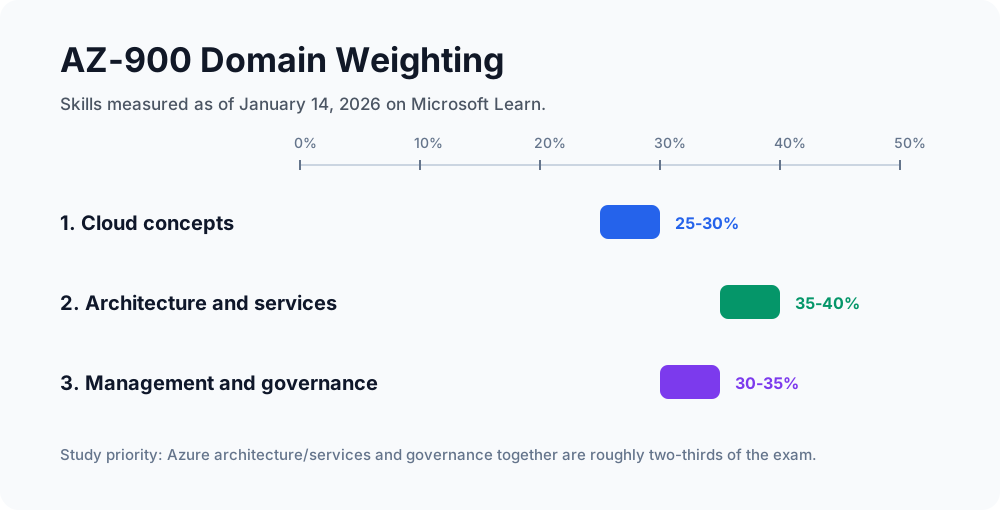
| Domain | Weight | What To Prioritize |
|---|---|---|
| Cloud concepts | 25-30% | Cloud models, shared responsibility, cloud benefits, service types, consumption pricing |
| Azure architecture and services | 35-40% | Regions, availability zones, compute, networking, storage, databases, identity, access, security |
| Azure management and governance | 30-35% | Cost management, pricing tools, Azure Policy, locks, tags, Purview, portal, Cloud Shell, ARM, monitoring |
Reading path: Use the domain map as a study plan, read the explanations in order, and return to the reference tables when you revise.
Domain 1.0 - Describe Cloud Concepts (25–30%)
1.1 What Is Cloud Computing & Shared Responsibility?
Cloud computing is the delivery of computing services - servers, storage, databases, networking, software, analytics, and intelligence - over the internet (“the cloud”) to offer faster innovation, flexible resources, and economies of scale.
The Shared Responsibility Model defines who is accountable for what across the cloud stack:
| Responsibility | On-Premises | IaaS | PaaS | SaaS |
|---|---|---|---|---|
| Physical datacenter | Customer | Microsoft | Microsoft | Microsoft |
| Network controls | Customer | Customer | Microsoft | Microsoft |
| Operating system | Customer | Customer | Microsoft | Microsoft |
| Applications | Customer | Customer | Customer | Microsoft |
| Identity & access | Customer | Customer | Customer | Shared |
| Data & information | Customer | Customer | Customer | Customer |
Key insight: As you move from IaaS → PaaS → SaaS, Microsoft takes on more responsibility and you take on less. However, identity and data are always a shared or customer responsibility, regardless of the service model.
1.2 Cloud Service Types: IaaS, PaaS, SaaS
Infrastructure as a Service (IaaS)
- You rent the raw infrastructure: VMs, storage, networking.
- You manage: OS, middleware, runtime, applications, data.
- Use case: Lift-and-shift migrations, test/dev environments.
- Azure examples: Azure Virtual Machines, Azure Blob Storage, Azure Virtual Networks.
Platform as a Service (PaaS)
- You get a managed platform; focus on building and deploying apps.
- Microsoft manages: OS, runtime, infrastructure patches.
- Use case: Web apps, APIs, microservices development.
- Azure examples: Azure App Service, Azure SQL Database, Azure Functions.
Software as a Service (SaaS)
- Fully managed software delivered over the internet; nothing to install or manage.
- Use case: End-user productivity, collaboration, CRM.
- Azure examples: Microsoft 365, Dynamics 365, Microsoft Teams.
A simple pizza analogy makes the service models memorable: with IaaS, you receive the ingredients and cook the meal yourself; with PaaS, the oven and much of the preparation are managed for you; with SaaS, the finished pizza is delivered and ready to use.
1.3 Cloud Deployment Models
Public Cloud
- Resources are owned and operated by a third-party provider (Microsoft Azure) and delivered over the internet.
- Pros: No upfront capital cost, massive scalability, global reach, pay-as-you-go.
- Cons: Less control over infrastructure, potential compliance concerns.
- Example: An e-commerce startup running entirely on Azure.
Private Cloud
- Computing resources are used exclusively by one organisation. Can be hosted on-premises or by a third party.
- Pros: Maximum control, compliance-friendly, high security.
- Cons: Expensive CapEx, requires IT staff to maintain.
- Example: A government agency running Azure Stack HCI on-premises.
Hybrid Cloud
- Combines public and private clouds, allowing data and applications to move between them.
- Pros: Flexibility, data sovereignty compliance, burst to public cloud when needed.
- Cons: Complex to manage and integrate.
- Example: A bank keeps sensitive customer data on-premises but runs its public website on Azure.
Multi-Cloud
- Using multiple public cloud providers simultaneously (Azure + AWS + GCP).
- Managed via tools like Azure Arc.
1.4 Benefits of the Cloud
| Benefit | What It Means |
|---|---|
| High Availability | Resources stay up even when components fail. Measured as uptime SLAs (e.g., 99.99%). |
| Scalability | Ability to increase or decrease resources to handle demand. |
| Elasticity | Automatic scaling - resources expand/contract in real time without manual intervention. |
| Agility | Rapid provisioning of resources in minutes, accelerating innovation. |
| Geo-Distribution | Deploy to regions worldwide to serve users with low latency. |
| Disaster Recovery | Replicate data and apps across regions; recover quickly from outages. |
| Reliability | Redundant infrastructure ensures consistent performance. |
| Predictability | Consistent performance and cost (can budget accurately). |
| Security | Broad set of built-in security controls; Microsoft invests $1B+ annually in security. |
| Governance | Policy enforcement, auditing, and compliance monitoring at scale. |
| Manageability | Manage through portal, CLI, APIs, or ARM templates. |
Scalability vs. Elasticity: Scalability is your capacity to scale. Elasticity is automatic, dynamic scaling happening without manual action. Azure Virtual Machine Scale Sets are a great example of elasticity.
1.5 Consumption-Based Model: CapEx vs. OpEx
Capital Expenditure (CapEx)
- Large upfront investment in physical infrastructure (servers, data centers, networking gear).
- Costs are amortised over time.
- Example: Buying your own server rack.
Operational Expenditure (OpEx)
- Pay-as-you-go spending on services consumed.
- No upfront cost; expensed immediately.
- Example: Paying your Azure monthly bill.
Cloud computing is fundamentally an OpEx model - you pay for what you use, when you use it. This shifts IT costs from a capital budget to an operational budget, improving cash flow and reducing financial risk.
Why OpEx wins in the cloud:
- No over-provisioning or wasted idle hardware
- Scale down during off-peak hours → immediate cost savings
- Only pay for storage/compute actually consumed
1.6 Sustainability and Green IT in Azure
Microsoft has made significant commitments to sustainability:
- Carbon negative by 2030 - removing more carbon from the atmosphere than it emits.
- Water positive by 2030 - replenishing more water than it consumes.
- Zero waste by 2030 - sending zero waste to landfills.
- 100% renewable energy by 2025 for all datacenters.
Azure’s sustainability tools:
- Microsoft Sustainability Manager - tracks, reports, and reduces environmental impact.
- Azure’s datacenters use advanced cooling, renewable energy, and water recycling.
- Carbon-aware workloads - Azure shifts workloads to regions with lower carbon intensity.
Cloud can actually be greener than on-premises: Azure datacenters run at 1.12–1.18 PUE (Power Usage Effectiveness), far better than the industry average of 1.58. Shared infrastructure means less waste.
Domain 2.0 - Describe Azure Architecture and Services (35–40%)
2.1 Azure Physical Infrastructure
Datacenters The physical buildings housing servers, networking, power, and cooling. You don’t interact with them directly, but they form the backbone of Azure.
Regions A region is a set of datacenters deployed within a defined perimeter, connected via a dedicated low-latency network. Azure has 60+ regions globally.
- Example regions: East US, West Europe, Southeast Asia, Australia East.
- Each region is paired with another nearby region (Region Pair) for disaster recovery and data replication.
Availability Zones Physically separate datacenters within a single region, each with independent power, cooling, and networking.
| Concept | Explanation |
|---|---|
| Purpose | Protect against single datacenter failure within a region. |
| Minimum | 3 zones per region (where supported). |
| Use case | Deploy VMs across zones for 99.99% uptime SLA. |
| Azure layer | Example | Why it matters |
|---|---|---|
| Region | East US | A geographic area that contains Azure datacenters |
| Availability zones | Zones 1, 2, and 3 | Physically separate datacenters within the region |
Region Pairs
- Each Azure region is paired with another region at least 300 miles away.
- During planned maintenance, only one region in a pair is updated at a time.
- In a region-wide disaster, one region in a pair is prioritised for recovery.
- Example pairs: East US ↔ West US, North Europe ↔ West Europe.
Sovereign Regions Isolated from the main Azure infrastructure for specific government/compliance requirements:
- Azure Government - US government agencies.
- Azure China - operated by 21Vianet, separate from global Azure.
2.2 Azure Management Infrastructure
Resources The fundamental unit of Azure - anything you create and use: a VM, a database, a storage account, a virtual network.
Resource Groups
- Logical containers that hold related Azure resources.
- A resource can only belong to one resource group.
- Deleting a resource group deletes all resources inside it.
- Best practice: Group by lifecycle (delete together) or environment (dev/prod/test).
Subscriptions
- An authenticated and authorised access boundary to Azure services.
- Linked to an Azure account (Azure AD identity).
- Billing boundary - each subscription generates its own invoice.
- Access control boundary - apply policies and RBAC at the subscription level.
- An organisation can have multiple subscriptions (e.g., one per department).
Management Groups
- Containers that organise subscriptions for governance at scale.
- Apply Azure Policies and RBAC at the management group level - these cascade down to all subscriptions and resources beneath.
- Up to 6 levels deep (excluding root).
| Scope | Example | Typical use |
|---|---|---|
| Root management group | Organization | Top-level governance boundary |
| Management group | Production or Development | Group subscriptions by purpose |
| Subscription | Finance-Prod, HR-Prod, or DevTest | Billing and resource boundary |
2.3 Azure Compute Services
Azure Virtual Machines (VMs)
- Full control over the OS, software, and configuration.
- IaaS - you manage the OS and above.
- Use cases: Custom applications, legacy apps, precise OS configuration.
- VM Scale Sets: Deploy and auto-scale sets of identical VMs - true elasticity.
- Azure Spot VMs: Unused Azure capacity at deep discounts (up to 90%) - interruptible.
- Reserved VMs: Commit 1–3 years, save up to 72%.
Azure App Service
- Fully managed PaaS platform for web apps, REST APIs, and mobile backends.
- Supports: .NET, Java, Node.js, Python, PHP, Ruby.
- Built-in auto-scaling, CI/CD integration, SSL, and custom domains.
- No OS management required.
Azure Functions (Serverless)
- Event-driven, serverless compute - code runs only when triggered.
- Triggers: HTTP requests, timers, queue messages, blob storage events.
- Pay only for execution time and number of invocations.
- Max execution timeout: 10 minutes (default), up to unlimited on Premium plan.
- Use cases: Webhooks, lightweight APIs, IoT data processing, scheduled tasks.
Azure Container Instances (ACI)
- Run Docker containers without managing VMs or orchestrators.
- Fastest way to run a container on Azure.
- Use case: Simple isolated containers, batch jobs, CI/CD pipelines.
Azure Kubernetes Service (AKS)
- Managed Kubernetes - Microsoft handles control plane, upgrades, scaling.
- You focus on deploying and managing containerised workloads.
- Integrates with Azure Monitor, Azure AD, Azure Container Registry.
- Use case: Complex microservices architectures, production-grade container orchestration.
Azure Virtual Desktop
- Fully managed Windows desktop and app virtualisation running in Azure.
- Multi-session Windows 10/11 - multiple users on one VM.
- Use case: Remote workforces, BYOD policies, compliance-sensitive environments.
2.4 Azure Networking Services
Azure Virtual Networks (VNets)
- Isolated, private networks in Azure - the foundation of all Azure networking.
- Resources in the same VNet can communicate by default.
- Subnets segment a VNet for organisation and security.
- Peering: Connect two VNets (even across regions) privately - no public internet traversal.
Network Security Groups (NSGs)
- Firewall rules applied to subnets or individual NICs.
- Contains inbound and outbound security rules with priority ordering.
VPN Gateway
- Connects an Azure VNet to an on-premises network over an encrypted tunnel.
- Site-to-Site VPN: On-premises network ↔ Azure (persistent connection).
- Point-to-Site VPN: Individual device ↔ Azure (remote worker use case).
- VNet-to-VNet VPN: Connect Azure VNets across regions via encrypted tunnel.
Azure ExpressRoute
- Private, dedicated connection from on-premises to Azure via a connectivity partner.
- NOT over the public internet - lower latency, higher reliability, more consistent bandwidth.
- Speeds: 50 Mbps to 100 Gbps.
- Use case: Large enterprises with high-bandwidth, compliance-sensitive, or latency-sensitive workloads.
| Feature | VPN Gateway | ExpressRoute |
|---|---|---|
| Traffic path | Public internet (encrypted) | Private connection |
| Latency | Higher | Lower, predictable |
| Bandwidth | Up to 10 Gbps | Up to 100 Gbps |
| Cost | Lower | Higher |
| Reliability | Internet-dependent | Higher (SLA-backed) |
Azure DNS
- Host your DNS domains in Azure for high availability and fast query performance.
- Integrates with Azure resources via alias records.
- Azure Private DNS: Resolve names within a VNet without exposing to the internet.
Azure Content Delivery Network (CDN)
- Caches content at edge nodes worldwide to reduce latency for end users.
Azure Load Balancer
- Distributes inbound traffic across multiple backend VMs.
- Layer 4 (TCP/UDP) load balancing.
- Internal (private) or public-facing.
Azure Application Gateway
- Layer 7 (HTTP/HTTPS) load balancer with URL-based routing, SSL termination, and a Web Application Firewall (WAF).
2.5 Azure Storage Services
Storage Account Types
- Standard General-Purpose v2 - recommended for most scenarios.
- Premium - for low-latency, high-throughput workloads.
Azure Blob Storage
- Unstructured object storage for text, binary, images, videos, backups.
- Accessed via HTTP/HTTPS, REST API, or SDKs.
- Use cases: Media streaming, log files, backup archives, data lake storage.
Access Tiers (Blob):
| Tier | Access Frequency | Storage Cost | Access Cost |
|---|---|---|---|
| Hot | Frequently accessed | Highest | Lowest |
| Cool | Infrequently accessed (30+ days) | Lower | Higher |
| Cold | Rarely accessed (90+ days) | Lower | Higher |
| Archive | Long-term retention (180+ days) | Lowest | Highest + rehydration time |
Archive tier data is offline - you must rehydrate it (move to Hot/Cool) before accessing. This can take hours.
Azure File Storage
- Fully managed file shares accessed via the SMB (Server Message Block) or NFS protocol.
- Mount from Windows, Linux, or macOS - no code changes required.
- Use case: Replace or supplement on-premises file servers, lift-and-shift apps requiring file shares.
Azure Queue Storage
- Message storage for asynchronous communication between application components.
- Each message can be up to 64 KB.
- Use case: Decoupling microservices, task queues, reliable messaging.
Azure Table Storage
- NoSQL key-value store for structured data.
- Now superseded by Azure Cosmos DB Table API for more advanced scenarios.
Azure Disk Storage
- Block-level storage volumes attached to Azure VMs (like a hard drive).
- Managed Disks: Microsoft manages the storage account - recommended.
- Types: Ultra Disk, Premium SSD v2, Premium SSD, Standard SSD, Standard HDD.
Storage Redundancy Options:
| Option | Replicas | Geographic Spread |
|---|---|---|
| LRS (Locally Redundant) | 3 copies | Single datacenter |
| ZRS (Zone Redundant) | 3 copies | 3 AZs in one region |
| GRS (Geo-Redundant) | 6 copies | 2 regions (3 each) |
| GZRS (Geo-Zone Redundant) | 6 copies | ZRS primary + LRS secondary |
2.6 Azure Database Services
Azure Cosmos DB
- Microsoft’s globally distributed, multi-model NoSQL database.
- Single-digit millisecond latency at any scale.
- Supports multiple APIs: SQL (Core), MongoDB, Cassandra, Gremlin, Table.
- 5 consistency levels: Strong, Bounded Staleness, Session, Consistent Prefix, Eventual.
- Use case: Gaming leaderboards, IoT data, globally distributed apps, real-time personalisation.
Azure SQL Database
- Fully managed PaaS relational database based on Microsoft SQL Server.
- Built-in HA, backups, patching - no DBA required for infrastructure.
- Purchasing models: DTU (simple, bundled) or vCore (more control, hybrid licensing).
- Use case: New cloud-native apps, web app backends, SaaS applications.
Azure SQL Managed Instance
- Fully managed SQL Server instance with near 100% compatibility with on-premises SQL Server.
- Ideal for lift-and-shift migrations from on-premises SQL Server.
- Runs inside a VNet for network isolation.
- Supports features not available in Azure SQL Database: SQL Agent, cross-database queries, linked servers.
Azure Database for PostgreSQL / MySQL / MariaDB
- Fully managed open-source database engines.
- Automatic backups, high availability, scaling.
- Use case: Open-source stacks, LAMP/MEAN applications.
Comparison: When to use what
| Scenario | Recommended Service |
|---|---|
| New cloud app, relational data | Azure SQL Database |
| Migrate existing SQL Server (complex features needed) | SQL Managed Instance |
| Global scale, NoSQL, multi-model | Azure Cosmos DB |
| Open-source PostgreSQL workload | Azure DB for PostgreSQL |
| IoT sensor data, time-series | Azure Cosmos DB |
Domain 3.0 - Describe Azure Management and Governance (30–35%)
3.1 Cost Management and Pricing Tools
Factors Affecting Azure Costs:
- Resource type - Different services have different cost structures.
- Consumption - How much you use (hours of VM uptime, GB of storage, etc.).
- Region - Prices vary by datacenter location.
- Subscription type - Pay-as-you-go vs. Enterprise Agreement vs. Dev/Test.
- Azure Marketplace - Third-party software licences may add cost.
Cost Optimisation Strategies:
| Concept | Explanation |
|---|---|
| Reserved Instances | Commit 1 or 3 years → save up to 72%. |
| Azure Hybrid Benefit | Use existing Windows Server/SQL Server licences on Azure. |
| Spot VMs | Use spare capacity at up to 90% discount (interruptible). |
| Right-sizing | Monitor usage and downsize over-provisioned resources. |
| Auto-shutdown | Schedule VMs to shut down outside business hours. |
| Tags | Tag resources to allocate costs to teams/projects. |
Azure Pricing Calculator
- Estimate the cost of Azure services before you deploy.
- Configure services, regions, and pricing tiers to get a monthly estimate.
- Export and share estimates.
- URL:
https://azure.microsoft.com/pricing/calculator/
Total Cost of Ownership (TCO) Calculator
- Compare the cost of your current on-premises infrastructure vs. running it in Azure.
- Factor in: hardware, software licences, electricity, cooling, IT staff, facilities.
- Great for making the business case for cloud migration.
- URL:
https://azure.microsoft.com/pricing/tco/calculator/
Azure Cost Management + Billing
- Monitor, analyse, and optimise your Azure spending.
- Set budgets and alerts to be notified when spending thresholds are reached.
- View spending breakdowns by resource, resource group, subscription, or tag.
- Generate cost reports and export data.
3.2 Azure Governance Tools
Azure Policy
- A service that creates, assigns, and manages policies to enforce rules and compliance on Azure resources.
- Effects: Deny (block non-compliant resources), Audit (log without blocking), Append (add required properties), DeployIfNotExists.
- Initiatives: Groups of policies deployed together (e.g., “ISO 27001 compliance”).
- Example policy: “All storage accounts must use HTTPS-only access.”
Role-Based Access Control (RBAC)
- Manage who can do what on which Azure resources.
- Principle of least privilege - grant only the permissions needed.
- Built-in roles: Owner, Contributor, Reader, User Access Administrator.
- Custom roles: Define your own permission sets.
- Roles are assigned to: Users, Groups, Service Principals, Managed Identities.
- Scope: Management Group → Subscription → Resource Group → Resource (permissions inherit downward).
Resource Locks
- Prevent accidental modification or deletion of Azure resources.
- CanNotDelete: Users can read and modify, but cannot delete.
- ReadOnly: Users can only read the resource - no modifications or deletions.
- Applied at: Management Group, Subscription, Resource Group, or individual Resource level.
- Important: Locks override RBAC permissions - even an Owner cannot delete a locked resource without first removing the lock.
Azure Blueprints (Legacy - being replaced by Azure Deployment Environments and Policy)
- Define a repeatable set of Azure resources (ARM templates, policies, RBAC) to provision governed environments.
- Useful for establishing “landing zones” with pre-configured governance.
Tags
- Key-value metadata applied to Azure resources for organisation and cost tracking.
- Examples:
Environment: Production,CostCenter: IT-Dept,Owner: JohnSmith. - Tags do not inherit from parent resources or resource groups by default.
- Use Azure Policy to enforce tagging requirements.
3.3 Microsoft Purview for Data Governance
Microsoft Purview is a unified data governance and compliance platform that helps organisations understand, manage, and protect their data across on-premises, multi-cloud, and SaaS environments.
Key Capabilities:
Data Map
- Automatically scans and catalogues data sources (Azure, AWS S3, on-premises SQL, Salesforce, etc.).
- Creates a unified data map showing where data lives and how it flows.
Data Catalog
- Business-friendly searchable inventory of all data assets.
- Data stewards can add business glossary terms, classifications, and descriptions.
- Data lineage: Visualise how data moves and transforms across systems.
Data Insights
- Analytics dashboards showing data landscape trends: sensitivity labels, classifications, data storage volumes.
Information Protection (formerly AIP)
- Discover, classify, and protect sensitive data using sensitivity labels.
- Labels can apply encryption, access restrictions, and visual markings.
- Sensitive information types: Credit card numbers, social security numbers, health data, custom regex patterns.
Data Loss Prevention (DLP)
- Policies that prevent sensitive data from being shared inappropriately (email, Teams, SharePoint, endpoints).
Compliance Manager
- Assess your compliance posture against 300+ regulatory frameworks (GDPR, ISO 27001, HIPAA, NIST).
- Provides improvement actions and a compliance score.
For the AZ-900 exam, understand that Purview provides: unified governance, data cataloguing, lineage, sensitivity classification, and compliance management - all without code.
3.4 Monitoring and Management Tools
Azure Monitor
- The central monitoring platform for all Azure resources.
- Collects metrics (numerical time-series data like CPU %) and logs (structured records of events).
- Key features:
- Alerts: Notify you when thresholds are crossed (e.g., CPU > 80% for 5 minutes).
- Dashboards: Custom visualisations of your monitoring data.
- Workbooks: Interactive data analysis.
- Application Insights: APM (Application Performance Monitoring) for web apps - traces, exceptions, dependencies.
- Log Analytics: Query logs using Kusto Query Language (KQL).
Azure Service Health
- Personalised view of the health of Azure services and regions that you are using.
- Three components:
- Azure Status: Global Azure service status page (all customers).
- Service Health: Status of services in regions you use.
- Resource Health: Status of your specific resources (e.g., is my VM healthy?).
- Receive alerts when Azure incidents affect your resources.
Azure Advisor
- AI-powered consultant that analyses your Azure usage and recommends improvements across five categories:
- Cost - Identify idle resources, rightsizing opportunities.
- Security - Recommendations from Microsoft Defender for Cloud.
- Reliability - Improve HA and resilience.
- Operational Excellence - Best practices for deployment and management.
- Performance - Speed up applications.
Azure Arc
- Extend Azure management and governance to non-Azure environments:
- On-premises servers (Windows/Linux)
- Other cloud providers (AWS, GCP)
- Kubernetes clusters anywhere
- Apply Azure Policy, RBAC, tags, and Monitor to Arc-enabled resources.
Azure Resource Manager (ARM)
- The deployment and management layer for Azure - every Azure API call goes through ARM.
- Deploy resources via: Azure Portal, Azure CLI, Azure PowerShell, ARM Templates, Bicep, Terraform.
- ARM Templates: JSON-based infrastructure-as-code (IaC) declarative templates.
- Bicep: Microsoft’s own IaC language - cleaner syntax, compiles to ARM JSON.
3.5 Azure OpenAI Service and Responsible AI
Azure OpenAI Service
- Access to OpenAI’s powerful models (GPT-4, DALL-E, Whisper, Embeddings) through Azure’s secure, enterprise-grade infrastructure.
- Data stays within your Azure tenant - not used to train OpenAI models.
- Integrates with Azure security (Private Endpoints, RBAC, VNet).
- Use cases: Copilot applications, document summarisation, code generation, semantic search, customer service bots.
Key Models Available:
| Concept | Explanation |
|---|---|
| GPT-4 / GPT-3.5-Turbo | Large language models for text generation, chat, summarisation. |
| DALL-E | Image generation from text prompts. |
| Whisper | Speech-to-text transcription. |
| Ada / text-embedding models | Generate vector embeddings for semantic search (RAG patterns). |
Microsoft’s 6 Responsible AI Principles:
| Principle | What It Means |
|---|---|
| Fairness | AI systems should treat all people equitably, avoiding discriminatory outcomes. |
| Reliability & Safety | AI must perform consistently and safely across different conditions and edge cases. |
| Privacy & Security | Protect personal data; AI systems must respect individual privacy. |
| Inclusiveness | AI should empower and benefit everyone, regardless of ability, geography, or background. |
| Transparency | People should understand how AI systems make decisions. |
| Accountability | Humans must be accountable for AI systems and their outcomes. |
Azure AI Content Safety
- Service to detect and filter harmful content (hate speech, violence, sexual content, self-harm) in AI-generated outputs.
- Essential for responsible deployment of generative AI applications.
The AZ-900 exam tests awareness of these principles, not implementation details. Know all 6 by name and their core meaning.
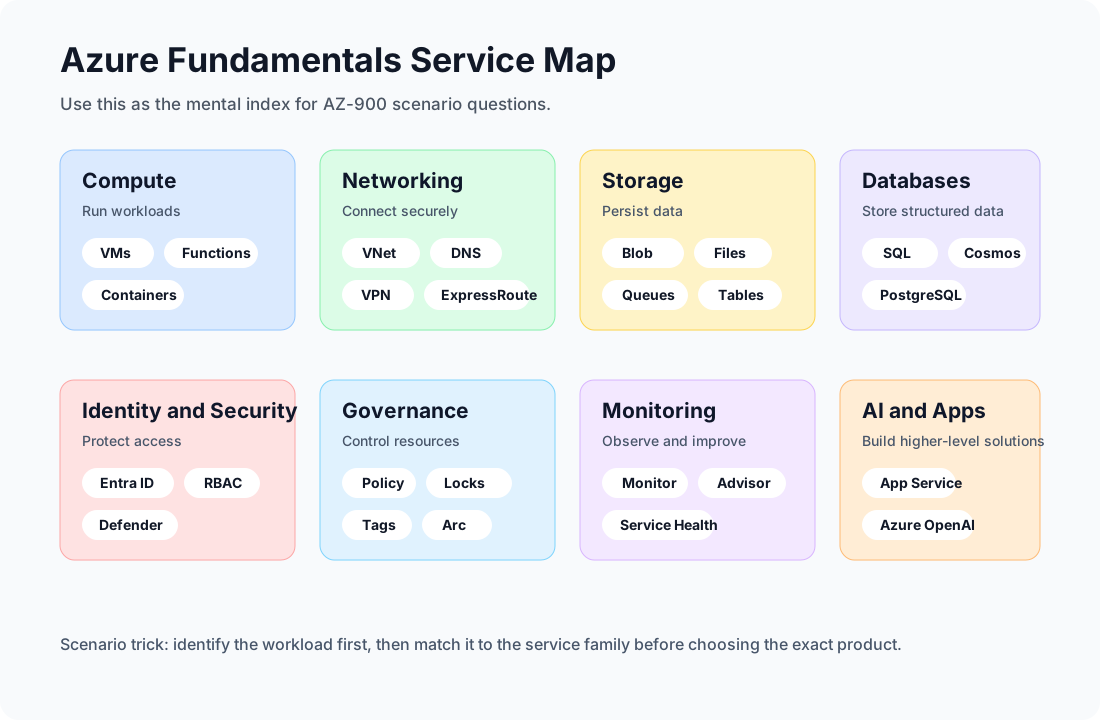
Quick Reference: Azure Services Cheatsheet
| Category | Service | One-liner |
|---|---|---|
| Compute | Virtual Machines | IaaS - full OS control |
| Compute | App Service | PaaS - managed web apps |
| Compute | Azure Functions | Serverless, event-driven code |
| Compute | AKS | Managed Kubernetes |
| Compute | ACI | Containers without orchestration |
| Networking | VNet | Private Azure network |
| Networking | VPN Gateway | Encrypted internet tunnel to on-premises |
| Networking | ExpressRoute | Private dedicated circuit to Azure |
| Networking | Azure DNS | Host and resolve DNS in Azure |
| Networking | Load Balancer | Layer 4 traffic distribution |
| Networking | Application Gateway | Layer 7 with WAF |
| Storage | Blob | Object/unstructured storage |
| Storage | Files | SMB/NFS managed file shares |
| Storage | Queue | Async message queue |
| Storage | Disk | Block storage for VMs |
| Database | SQL Database | Managed PaaS SQL Server |
| Database | SQL Managed Instance | Near-100% SQL Server compatible, lift-and-shift |
| Database | Cosmos DB | Global NoSQL, multi-model |
| Governance | Azure Policy | Enforce compliance rules |
| Governance | RBAC | Control who can do what |
| Governance | Resource Locks | Prevent accidental changes |
| Governance | Purview | Data governance & compliance |
| Monitoring | Azure Monitor | Central metrics, logs, alerts |
| Monitoring | Service Health | Azure status for your services |
| Monitoring | Azure Advisor | AI-powered recommendations |
| Cost | Pricing Calculator | Estimate before you deploy |
| Cost | TCO Calculator | On-premises vs. Azure cost comparison |
| Cost | Cost Management | Monitor and optimise actual spend |
| AI | Azure OpenAI Service | GPT, DALL-E, Whisper in Azure |
Exam Tips
- Know the shared responsibility model cold - which layer belongs to customer vs. Microsoft for IaaS/PaaS/SaaS.
- Availability Zones ≠ Region Pairs - AZs protect within a region (datacenter failure), region pairs protect from region-level outages.
- CapEx vs. OpEx - Cloud is OpEx. Understand why this matters financially.
- Resource hierarchy: Resource → Resource Group → Subscription → Management Group. Policies and RBAC cascade downward.
- Blob access tiers - Archive is offline and requires rehydration. Know which tier to use for what frequency of access.
- SQL Database vs. SQL Managed Instance - MI has near-100% SQL Server feature parity (SQL Agent, linked servers); use it for migrations.
- VPN Gateway uses the public internet (encrypted); ExpressRoute does NOT go over the internet.
- Resource Locks override RBAC - even an Owner can’t delete a locked resource without first removing the lock.
- Azure Monitor = metrics + logs; Service Health = Azure platform health affecting your resources.
- Responsible AI: Memorise all 6 principles - Fairness, Reliability & Safety, Privacy & Security, Inclusiveness, Transparency, Accountability.
Read-only Azure inventory example
Use the Azure CLI to confirm the active subscription and inspect a bounded resource inventory before discussing services, regions, or governance controls:
SUBSCRIPTION_ID='00000000-0000-0000-0000-000000000000'

az account show --query '{name:name,id:id,tenantId:tenantId}' --output json
az resource list --subscription "$SUBSCRIPTION_ID" \
  --query '[].{name:name,type:type,location:location,group:resourceGroup}' \
  --output table
Replace the example subscription identifier and use an account with read-only scope where possible. These commands do not create or update resources.
Sources
Good luck on the exam. The AZ-900 is designed to be approachable, but a structured review like this one makes the difference between scraping through and walking out with confidence. ☁️