A GitHub Actions cache “miss” is not one condition. It can mean:
- no entry has the requested key;
- a prefix restore succeeded, but the exact-key output is not
true; - the key exists in an inaccessible branch scope;
- the key text matches, but the cache version differs;
- the previous job never saved the cache;
- the cache was evicted.
The reliable way to diagnose it is to expose the evaluated key, scope, version inputs, and save path—then compare them with the repository’s cache inventory.
Understand the lookup before changing YAML
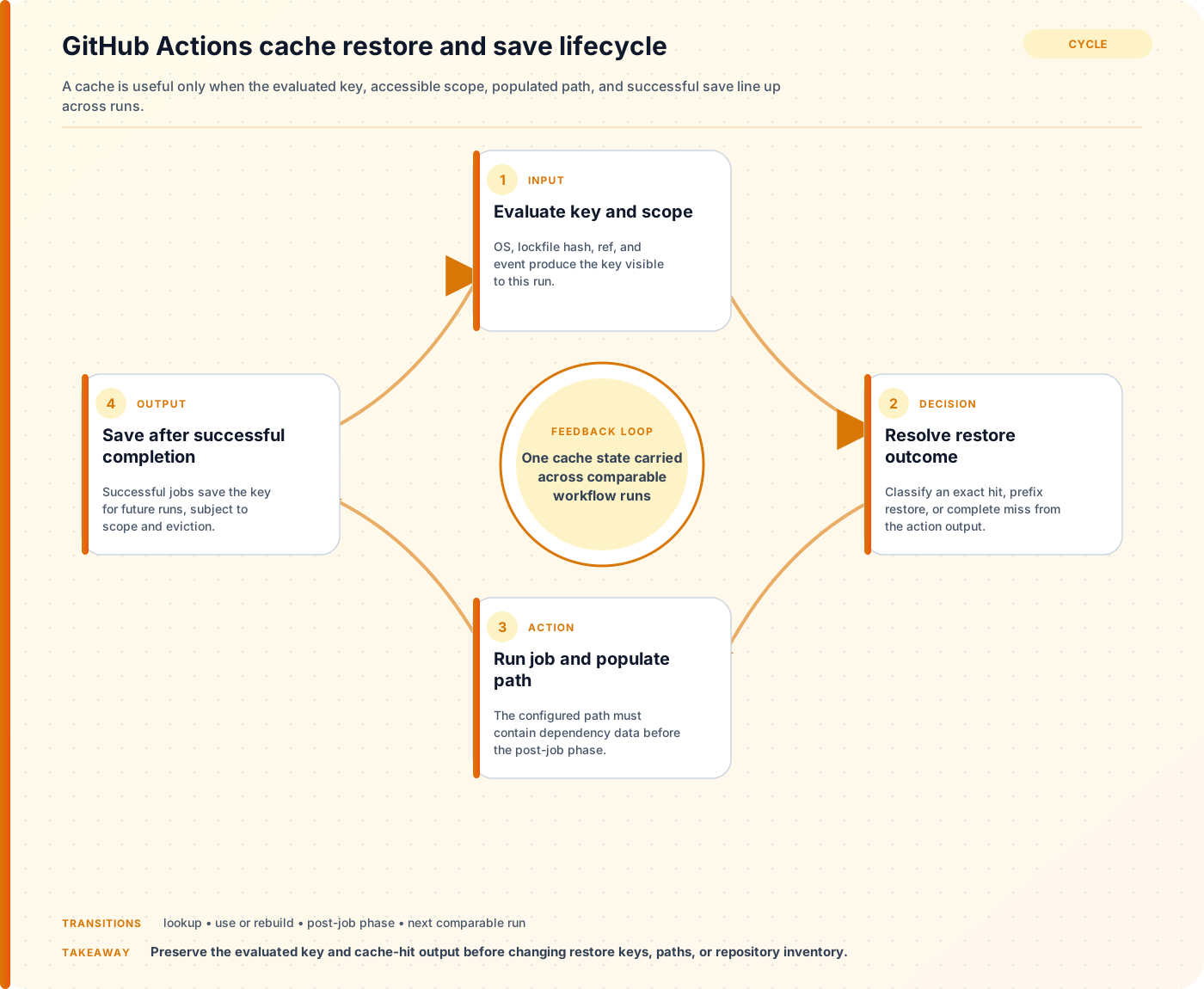
For actions/cache, GitHub searches using the key and an internal cache version. At a high level:
- Look for an exact key and version in the current branch scope.
- Look for prefix matches.
- Try each
restore-keysprefix in order. - If needed, repeat the permitted search against the default branch.
- On a miss, save a new cache after a successful job.
The cache version incorporates metadata about the cached paths and compression tool. The same visible key can therefore miss when those inputs are incompatible.
Caches are also scope-restricted. A workflow can generally restore entries from its current branch and default branch, plus the base branch for pull-request runs. It cannot freely read sibling or child branch caches. A cache created by a pull_request run belongs to the pull request merge ref and is not a general cache for main.
Start with an observable workflow
Prefer the package manager’s setup action when it supports your ecosystem:
- uses: actions/checkout@v6

- uses: actions/setup-node@v6
  with:
    node-version: 24
    cache: npm
    cache-dependency-path: package-lock.json

- run: npm ci
For custom paths, make every key component visible:
- name: Compute cache inputs
  id: cache-inputs
  shell: bash
  run: |
    echo "lock_hash=${{ hashFiles('**/package-lock.json') }}"
    echo "runner_os=${{ runner.os }}"
    echo "ref=${{ github.ref }}"
    echo "base_ref=${{ github.base_ref }}"

- name: Restore npm download cache
  id: npm-cache
  uses: actions/cache@v4
  with:
    path: ~/.npm
    key: npm-${{ runner.os }}-${{ hashFiles('**/package-lock.json') }}
    restore-keys: |
      npm-${{ runner.os }}-

- name: Explain cache result
  shell: bash
  run: |
    echo "exact_hit=${{ steps.npm-cache.outputs.cache-hit }}"
    echo "primary_key=npm-${{ runner.os }}-${{ hashFiles('**/package-lock.json') }}"
Do not print secrets or dump the entire context. Print only the values needed to reproduce the lookup.
Exact hit, prefix restore, or complete miss?
The cache-hit output is true only for an exact key match. A restored prefix is useful, but it is not an exact hit:
- if: steps.npm-cache.outputs.cache-hit != 'true'
  run: npm ci
This condition runs for both a partial restore and a complete miss, which is usually correct for dependency installation: restored package downloads accelerate npm ci, while the lockfile still determines the installed tree.
Do not skip a deterministic install merely because a broad prefix restored old dependencies.
Inspect the actual cache inventory
With GitHub CLI:
gh cache list \
  --repo OWNER/REPOSITORY \
  --limit 100 \
  --json id,key,ref,sizeInBytes,createdAt,lastAccessedAt
Filter by key:
gh cache list \
  --repo OWNER/REPOSITORY \
  --key "npm-Linux-" \
  --limit 100
Compare:
- fully evaluated key;
refscope;- creation and last-access time;
- size;
- expected operating system and architecture markers.
The Actions UI and REST API can also list caches. Inventory is stronger evidence than “another workflow used the same YAML.”
The seven common causes
1. hashFiles() evaluated to an empty string
A wrong path or different checkout directory can produce:
npm-Linux-
That key is valid but much broader than intended. Confirm checkout happened before key evaluation and that the lockfile exists with the same case:
- shell: bash
  run: |
    pwd
    find . -name package-lock.json -print
    echo "hash=${{ hashFiles('**/package-lock.json') }}"
2. The cached path is wrong
For npm, cache the package-manager download cache (~/.npm) rather than node_modules unless you have a measured reason to cache the installed tree. Verify the path after the install:
npm config get cache
du -sh ~/.npm || true
An empty or nonexistent path creates little value and may produce a save warning.
3. The job did not reach the post-job save
actions/cache restores during its step and saves in a post-job phase after a successful job. If tests fail, a runner is cancelled, or the process is terminated, the new cache may never be written. Inspect the end of the job log for the cache save.
For advanced workflows, actions/cache/restore and actions/cache/save make save placement explicit, but you must preserve security and correctness yourself.
4. Branch or pull-request scope differs
Print:
- run: |
    echo "event=${{ github.event_name }}"
    echo "ref=${{ github.ref }}"
    echo "base_ref=${{ github.base_ref }}"
A pull request cache often belongs to refs/pull/.../merge. A later push to main should not be expected to restore that PR-scoped entry.
5. Version inputs changed
Changing path, compression compatibility, or operating system can change cache compatibility even when key looks identical. Include platform details in cross-platform keys, and use enableCrossOsArchive only after reviewing its prerequisites and tradeoffs.
6. The key changes too often—or not often enough
A commit SHA guarantees misses on every commit:
key: build-${{ github.sha }}
A static key never saves new content because caches are immutable:
key: build-v1
Keys should change when the cached content becomes incompatible. Dependency lock hashes, toolchain versions, OS, architecture, and a manual schema version are common inputs.
7. Eviction and cache thrashing
GitHub applies repository storage and retention policies. Large, highly unique caches can evict one another. Inspect total sizes and last-access times; remove low-value caches or reduce key cardinality before increasing storage.
Design restore keys deliberately
key: gradle-${{ runner.os }}-jdk21-${{ hashFiles('**/*.gradle*', '**/gradle-wrapper.properties') }}
restore-keys: |
  gradle-${{ runner.os }}-jdk21-
  gradle-${{ runner.os }}-
Each line broadens compatibility. Ask what stale content it may restore. The install/build step must validate or replace restored entries.
Avoid a prefix so broad that unrelated toolchain or platform artifacts become inputs to privileged build steps.
Cache security is part of correctness
GitHub warns that people able to open pull requests may be able to read caches available to the base branch. Never cache:
- tokens, credentials, signing material, or
.envsecrets; - authenticated configuration files;
- private user data;
- untrusted executable output that a privileged workflow later runs without validation.
Low-trust triggers also have restricted cache-write behavior to reduce cache poisoning. Do not work around those boundaries simply to remove a warning.
Pin third-party actions to trusted revisions according to your supply-chain policy, minimize token permissions, and treat restored executable artifacts as inputs requiring provenance.
A five-minute triage sequence
- Print the exact evaluated primary key and lockfile hash.
- Print event, ref, base ref, OS, and architecture.
- Confirm the cached path exists and contains the expected data.
- Classify
cache-hitas exact, partial, or absent. - List repository caches and compare key plus ref.
- Inspect the end of the producer job for a successful save.
- Check recent path/action/runner changes that affect cache version.
- Check size, eviction, and overly unique keys.
Change one variable at a time. Deleting every cache may temporarily hide a bad key and removes the evidence needed to diagnose it.