“The pod cannot reach orders” describes at least four different failures:
- The pod generated a different DNS query than expected.
- Cluster DNS did not answer correctly.
- DNS resolved, but the Service virtual IP was unreachable.
- The Service was reachable, but no healthy backend served the request.
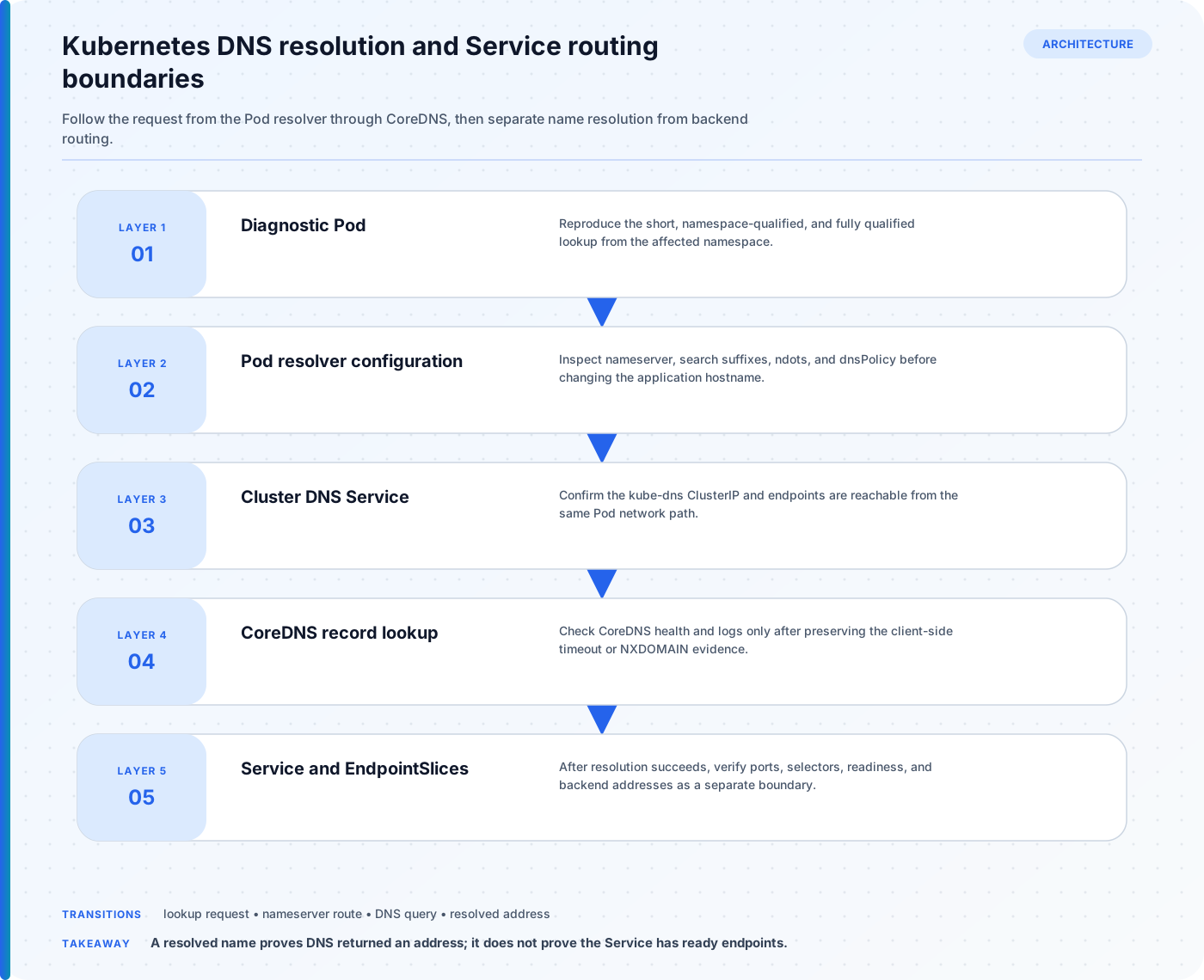
Changing CoreDNS before locating the failing layer usually adds noise. Start inside the affected pod or namespace and move outward one boundary at a time.
Capture the symptom precisely
Record:
- namespace, pod, container, node, and cluster;
- exact hostname and port;
- error text (
NXDOMAIN, timeout, connection refused, TLS error); - when it started and whether every pod is affected;
- whether the fully qualified name works;
- recent Deployment, Service, NetworkPolicy, or DNS changes.
Use a disposable diagnostic pod only when the application image lacks tools:
kubectl run dns-debug \
  --rm -it \
  --restart=Never \
  --image=registry.k8s.io/e2e-test-images/dnsutils:1.3 \
  --namespace=shop \
  -- /bin/sh
For a production incident, capture output before deleting the pod.
Step 1: inspect the pod’s resolver view
kubectl exec -n shop deploy/web -- cat /etc/resolv.conf
A typical pod using dnsPolicy: ClusterFirst has:
search shop.svc.cluster.local svc.cluster.local cluster.local
nameserver 10.96.0.10
options ndots:5
Do not assume these exact values; the cluster domain and DNS Service IP are configurable.
Check the workload:
kubectl get pod -n shop web-abc123 \
  -o jsonpath='{.spec.dnsPolicy}{"\n"}{.spec.dnsConfig}{"\n"}'
Important cases:
ClusterFirstis the normal cluster-DNS policy for pods.Defaultinherits the node’s resolver behavior.Nonerequires explicitdnsConfig.- Pods using
hostNetwork: truecommonly needClusterFirstWithHostNetfor cluster DNS behavior.
Compare a failing pod with a working pod in the same namespace. Differences are stronger evidence than a generic “correct” sample.
Step 2: test short and fully qualified names
For Service orders in namespace shop:
nslookup orders
nslookup orders.shop
nslookup orders.shop.svc.cluster.local
Kubernetes creates DNS names relative to namespaces. A pod in shop can usually resolve orders; a pod in payments should use orders.shop or the full service name.
If the FQDN works but the short name fails, investigate the search list, ndots, namespace expectation, and pod DNS policy. If all forms time out, focus on reaching the DNS Service. If they return NXDOMAIN, verify the name and object.
For applications that make many external lookups, ndots:5 can cause several search-suffixed queries before an absolute lookup. A trailing dot such as api.example.com. explicitly marks an absolute DNS name. Change resolver options only after measuring the application and understanding cluster-wide consequences.
Step 3: verify the Kubernetes object
kubectl get service orders -n shop -o wide
kubectl get service orders -n shop -o yaml
Check:
- exact name and namespace;
clusterIP(orNonefor a headless Service);- ports and target ports;
- selectors;
- Service type.
Service DNS behavior differs by type:
- A normal Service name resolves to its cluster IP.
- A headless Service (
clusterIP: None) resolves to addresses associated with selected endpoints. - ExternalName uses a DNS CNAME and has application-protocol caveats because the requested hostname may differ from the target hostname.
Test A/AAAA records separately from SRV records when service discovery depends on named ports.
Step 4: check the DNS control plane
Clusters commonly label CoreDNS pods k8s-app=kube-dns, even when the implementation is CoreDNS:
kubectl get pods -n kube-system -l k8s-app=kube-dns -o wide
kubectl get service -n kube-system kube-dns -o wide
kubectl get endpointslice -n kube-system \
  -l kubernetes.io/service-name=kube-dns
Look for ready replicas, restarts, pending pods, missing endpoints, or the DNS Service IP differing from the pod’s nameserver.
Inspect logs without immediately editing configuration:
kubectl logs -n kube-system \
  -l k8s-app=kube-dns \
  --prefix \
  --tail=200
If the query never appears, traffic may not reach DNS. If CoreDNS reports upstream failures, compare internal Service lookups with external names and inspect its configured forwarders:
kubectl get configmap -n kube-system coredns -o yaml
Redact sensitive internal zones before sharing the output.
Step 5: test network reachability to DNS
A timeout is different from NXDOMAIN. Determine whether UDP and TCP port 53 can reach the DNS Service from the affected pod.
Check policies:
kubectl get networkpolicy -A
kubectl describe networkpolicy -n shop
In a default-deny egress namespace, allow:
- UDP 53 to the cluster DNS endpoints or Service path;
- TCP 53 for larger responses, retries, and operations that require it.
The exact policy selectors depend on the CNI and cluster DNS placement. Do not copy a broad allow rule without confirming it selects the intended destination.
Node-specific failures suggest CNI routing, kube-proxy/service implementation, node resolver, or node firewall differences. Compare failing and working pods scheduled on different nodes.
Step 6: separate DNS from Service routing
Once the name resolves, capture the address:
getent hosts orders.shop.svc.cluster.local
Then inspect Service backends:
kubectl get endpointslice -n shop \
  -l kubernetes.io/service-name=orders \
  -o wide

kubectl get pods -n shop \
  -l app=orders \
  -o wide
An empty EndpointSlice usually points to mismatched selectors, unready pods, or manually managed endpoints. That is not a DNS-record failure.
Test the application protocol:
curl -sv --connect-timeout 3 \
  http://orders.shop.svc.cluster.local:8080/health
Interpret the layers:
| Symptom | Likely boundary |
|---|---|
NXDOMAIN |
Name/namespace/object or DNS record generation |
| DNS timeout | Pod-to-DNS networking or unhealthy DNS |
| Resolves, connection timeout | Service routing, policy, node, or backend path |
| Resolves, connection refused | Port/target process mismatch |
| HTTP 5xx | Application/backend behavior |
| TLS hostname failure | Certificate/SNI/hostname contract |
A compact evidence script
Run commands individually when permissions vary:
NAMESPACE=shop
SERVICE=orders

kubectl get service "$SERVICE" -n "$NAMESPACE" -o wide
kubectl get endpointslice -n "$NAMESPACE" \
  -l "kubernetes.io/service-name=$SERVICE" -o wide
kubectl get pods -n kube-system -l k8s-app=kube-dns -o wide
kubectl get service -n kube-system kube-dns -o wide
Inside the affected pod:
cat /etc/resolv.conf
nslookup orders
nslookup orders.shop.svc.cluster.local
Preserve command output with timestamps and the pod UID. Pods are replaceable; the evidence disappears quickly.
Avoid these incident shortcuts
- Restarting CoreDNS before determining whether queries reach it.
- Editing
/etc/resolv.confinside a running pod; it is generated and not a durable fix. - Treating a successful lookup as proof the application port works.
- Testing only from a laptop, which uses different DNS and networking paths.
- Installing tools into an immutable production container.
- Ignoring TCP 53 because ordinary queries usually use UDP.
- Broadly disabling NetworkPolicy instead of proving the required flow.
The fastest safe path is a ladder: pod resolver → expected record → DNS Service and CoreDNS → network path → Service → EndpointSlice → backend. Stop at the first boundary where a failing and working case differ.